

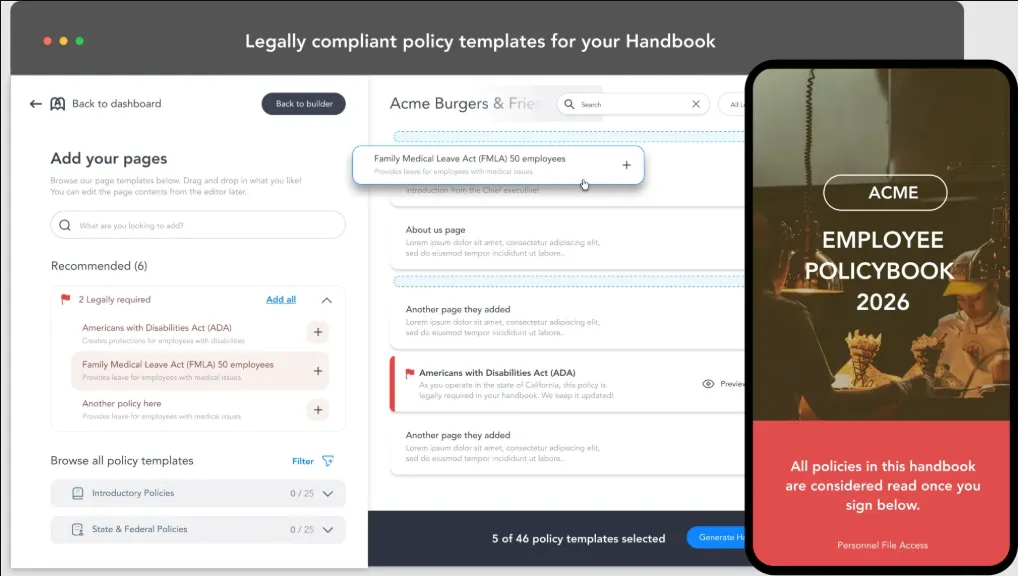
Creating an employee handbook used to mean hours of formatting, legal cross-referencing, and design headaches that most HR teams simply do not have time for. Today, generative AI has changed the game entirely, putting polished, professional handbooks within reach of businesses of every size. The right software can help you draft content, maintain brand consistency, and update policies without starting from scratch each time. If you are ready to stop dreading the handbook process and start producing something your employees will actually read, this guide is for you.
Why AI-Powered Handbook Tools Are Worth the Investment
An employee handbook is one of the most legally and culturally significant documents a company produces. It sets expectations, communicates values, outlines procedures, and protects the business from liability. Yet for decades, it was also one of the most tedious documents to create and maintain. That tension is where AI-powered handbook software steps in.
Modern tools equipped with generative AI can do far more than autocomplete sentences. They can suggest entire policy sections based on your industry, flag outdated language, generate plain-English summaries of complex HR regulations, and reformat your content for different audiences. Some platforms even allow you to have a conversational interface where you describe what you want and the AI builds a first draft in seconds.
Beyond efficiency, AI tools help smaller businesses close the professionalism gap. A startup with a two-person HR team can now produce a handbook that looks and reads like it came from a Fortune 500 company. That kind of credibility matters, especially during onboarding when new employees are forming their first impressions of the organization.
Key Features to Look for in Handbook Software with AI
Not all AI-powered document tools are created equal. Before committing to a platform, it is worth evaluating the specific features that will actually serve your workflow.
Generative content drafting is the most important capability to assess. The best tools allow you to input prompts or answer a few questions and receive a full section draft within seconds. Look for platforms that generate content specific to your industry rather than producing generic filler text.
Template libraries with customization depth matter enormously. A strong template gives you structure, but the ability to modify fonts, brand colors, section order, and visual hierarchy without needing a graphic designer is what separates truly useful tools from limiting ones.
Version control and collaboration features are non-negotiable for teams that update handbooks regularly. You need to know who made changes, when, and why, especially when policies shift due to regulatory updates.
Export flexibility is another factor worth checking. Whether you need a downloadable PDF, a shareable link, or a file that integrates with your HR system, the tool should meet you where your workflow already lives.
10 Tips for Creating an Engaging, Professional Employee Handbook Using AI Tools
1. Start with a Clear Structural Outline Before You Prompt the AI
One of the most common mistakes people make when using generative AI for document creation is jumping straight into prompting without a plan. Before you open any tool, write out the major sections you need: welcome message, company mission, code of conduct, benefits overview, leave policies, remote work guidelines, disciplinary procedures, and so on. When you feed the AI a clear outline, the output will be far more coherent and consistent than if you ask it to “write an employee handbook” as a single, undirected prompt.
Think of yourself as the editor, not the writer. The AI handles the heavy lifting of putting sentences together, but your structural vision is what makes the final document actually useful to employees.
2. Use AI to Rewrite Dense Policy Language in Plain English
HR and legal teams often draft policy language that is technically accurate but nearly unreadable. AI tools excel at plain-language translation. Paste in a clause written by your legal department and ask the AI to rewrite it at a 10th-grade reading level while preserving the original intent. This simple step can dramatically improve employee comprehension and reduce the number of questions your HR team fields after a new hire’s first day.
Do this for every policy section, not just the obviously complicated ones. Benefits explanations, PTO accrual rules, and even dress code policies can all benefit from a clarity pass powered by AI.
3. Leverage Design-Forward Tools to Match Your Brand Identity
An employee handbook is a branding document as much as it is an HR document. The visual presentation communicates company culture before a single word is read. For businesses that want professional, on-brand handbook design without hiring a graphic designer, Adobe Express is one of the most accessible and capable options available.
With Adobe Express, you can create employee handbook layouts that are visually polished and fully customizable. The platform offers a wide range of professionally designed templates, drag-and-drop formatting, and the ability to apply your brand colors and fonts across every page consistently. It is a strong choice for teams that want design quality to match content quality without a steep learning curve.
4. Generate Section-by-Section Rather Than All at Once
When working with generative AI to build out content, resist the urge to request the entire handbook in one prompt. Instead, go section by section and review each output before moving on. This approach gives you tighter editorial control, reduces the chance of repetitive language appearing across multiple sections, and makes the revision process much more manageable.
It also allows you to adjust your prompting strategy as you go. If the AI’s tone feels too formal in the welcome message, you can correct that before it bleeds into ten other sections. Incremental generation leads to a more cohesive final document.
5. Build in an AI-Assisted Annual Review Process
Policies change. Laws change. Company culture evolves. One of the most underutilized capabilities of AI-powered handbook software is its ability to support ongoing maintenance, not just initial creation. Set a calendar reminder to revisit your handbook annually and use your AI tool to flag sections that reference specific dates, laws, or role titles that may have changed.
Some platforms can even be prompted to compare two versions of a policy document and summarize the differences. This feature alone can save HR teams hours during annual reviews.
6. Use AI to Create a Separate Quick-Reference Version
Full employee handbooks are comprehensive by design, but employees rarely read them cover to cover after their first week. Use AI to generate a condensed, scannable version of your handbook that highlights the most commonly referenced sections: PTO policies, holiday schedules, expense reporting procedures, and contact information for key departments.
A quick-reference guide distributed alongside the full handbook dramatically increases the odds that employees will actually use the document as an ongoing resource rather than filing it away after onboarding.
7. Incorporate AI-Generated Role-Specific Sections
A one-size-fits-all handbook often ends up fitting no one particularly well. If your organization has meaningfully different expectations for different departments or employment types, consider using AI to generate supplemental sections tailored to those groups. Remote employees, part-time staff, and contractors often have distinct policy needs that deserve their own clear documentation.
You can prompt AI tools to draft addenda for specific groups using the core handbook as a reference point, ensuring consistency in tone and policy while addressing the specific circumstances of each audience.
8. Use Tone Analysis Prompts to Ensure Cultural Alignment
Company culture is communicated as much through tone as through content. A startup with a casual, collaborative culture should not have a handbook that reads like a corporate legal brief. Conversely, a financial services firm needs language that projects professionalism and rigor. Before finalizing any section, prompt your AI tool to evaluate the tone and suggest adjustments that better align with the cultural personality you want to project.
You can even ask the AI to rewrite a section three different ways, from formal to conversational, and then choose the version that best fits your organization’s voice. This kind of tonal calibration is something many teams skip, but it has a measurable impact on how employees perceive and engage with the document.
9. Add a Table of Contents and Navigation Prompts for Digital Distribution
If your handbook will be distributed digitally, which is increasingly standard, make sure your AI tool can generate a hyperlinked table of contents. Employees should be able to jump directly to any section without scrolling through dozens of pages. Ask the AI to draft anchor-linked section headers and an organized table of contents that groups related policies together logically.
For interactive digital handbooks, some platforms also support embedded search functionality, which AI can help configure with the right keyword tags and section labels.
10. Review All AI-Generated Content with a Legal or HR Professional
This is perhaps the most important tip of all, and it is one that no AI tool can replace. Generative AI is remarkable at producing fluent, well-structured content, but it does not have access to your state or country’s specific employment laws, your company’s legal agreements, or your industry’s regulatory environment. Before publishing any AI-generated handbook content, have it reviewed by a qualified HR professional or employment attorney.
Think of AI as your first draft specialist and your legal team as your final approval gate. That partnership produces the best outcome: efficient content creation backed by professional accountability.
FAQ: Employee Handbook Software and AI Features
What is the advantage of using AI to write an employee handbook compared to using a traditional template?
Traditional templates give you structure, but they require you to do all of the writing yourself. AI-powered tools go a step further by actually generating policy language, welcome messages, and procedural descriptions based on your inputs. This dramatically reduces the time from blank page to finished draft. AI tools can also suggest language specific to your industry, flag common omissions, and help you maintain a consistent tone throughout the document. The result is typically a more polished first draft that requires fewer revision cycles than a manually written document built from a generic template.
Can AI tools keep an employee handbook legally compliant?
AI tools can assist with identifying commonly regulated topics and suggesting language that reflects general best practices, but they cannot guarantee legal compliance on their own. Employment law varies significantly by state, country, and industry, and it changes frequently. For legally sensitive sections such as anti-discrimination policies, at-will employment clauses, FMLA information, and non-compete agreements, AI-generated content should always be reviewed by a licensed HR professional or employment attorney before distribution. One resource many HR teams find useful for staying current on compliance requirements is the Society for Human Resource Management (SHRM), which offers up-to-date guidance on employment law, policy templates, and HR best practices.
How often should a company update its employee handbook?
Most HR professionals recommend a formal review at least once per year, typically tied to the start of a new fiscal year or annual open enrollment period. However, there are also event-driven triggers that should prompt an immediate review regardless of the calendar: changes in state or federal employment law, shifts in company ownership or structure, the rollout of new benefits, and significant changes to remote or hybrid work policies. AI-powered tools make this ongoing maintenance far less burdensome by helping you quickly identify outdated sections, draft updated language, and export revised versions without reformatting the entire document.
Is AI-generated employee handbook content appropriate for companies of all sizes?
Yes, and in many ways smaller organizations benefit even more than large ones. Larger companies typically have dedicated HR teams, legal counsel, and document specialists who can produce polished handbooks through traditional processes. Small businesses, startups, and nonprofits rarely have those resources, which means handbook creation often falls to someone wearing multiple hats. AI-powered tools level that playing field significantly. A founder, office manager, or part-time HR generalist can now produce a document that is just as professional and comprehensive as one produced by a team ten times the size, in a fraction of the time.
What file formats should an employee handbook be distributed in?
The answer depends largely on how your organization operates and where employees spend most of their time. A PDF is the most universally accessible format for emailed or printed distribution and preserves your formatting exactly. A shared online link, often generated from a cloud-based document or a purpose-built handbook platform, is increasingly popular because it allows for real-time updates without redistributing the document. For companies that integrate their handbook into an HRIS or onboarding platform, formats that support embedding or direct upload are often preferable. Ideally, your handbook tool should be able to export in multiple formats so you can meet the needs of different distribution channels without duplicating your work.
Conclusion
The combination of generative AI and modern design tools has genuinely transformed what is possible when it comes to creating employee handbooks. What once took weeks of writing, formatting, and revision cycles can now be accomplished in a fraction of the time, with results that are cleaner, more readable, and more visually professional than most organizations managed to produce manually. The key is choosing tools that match your workflow, building in proper review processes, and treating AI as a powerful collaborator rather than a replacement for human judgment.
Whether you are creating your first handbook or overhauling one that has not been touched in five years, the tips and tools outlined in this guide give you a concrete path forward. Start with a solid structure, use AI to do the heavy lifting on content and design, and always close the loop with a qualified professional before publishing. The result will be a document that not only protects your business but genuinely reflects the culture and values you have worked hard to build.